
Advance Excel
Learn to use different functions of Excel along with creating graphs, plots, performing calculations etc.
About Advance Excel
Advanced Excel training provided by Tech Cryptors Training Academy is designed to help users to get the most out of their Excel software.
Tech Cryptors Training Academy’s Excel training covers a wide range of topics, such as data analysis, macros, functions and formulas, working with large data sets, creating charts, and more. We also provide custom training and consulting services to help users develop custom solutions to their business needs. Our training is designed to help users become more efficient and competent in their use of Excel, so they can get the most out of their data.
We have Trained professionals from











Understanding what is Advance Excel
Learn to create a basic bar chart based on table data
Learn to format and change design of chart
Learn to add leader lines in chart
Learn how to add different types of sparkline in excel
Learn to sort any data based on its color
Learn to apply different slicers on the data
Learn to efficiently use flash fill for more speed
Learn to create pivot table on many different conditions
Learn how to combine many tables in single pivot
Learn to create pivot chart for any type of data.
Learn to create different hierarchy charts and its formattings
Learn to create waterfall chart and how to add total bar in it
Learn to create funnel chart and surface chart
Learn to create radar chart and its different formattings
Learn to create different types of line charts
Learn to create histogarm and pareto chart and how to customize bin settings
Learn to create combo charts with different styles
Learn to efficiently create geographical maps in excel

Yes. Tech Cryptors Training Academy is ISO 9001:2015 CERTIFIED COMPANY under IAF. Also, we are in collaboration with Shastra INDIAN INSTITUTES TECHNOLOGY Madras. CERTIFICATION will have the significance of the above.
We conduct this course in BOTH online and offline modes. You can choose the mode suitable for you, even you can SWITCH modes for a couple of lectures in case of any personal issues and emergencies.
In one batch we allow MAXIMUM 4 students Because we believe that to have a better understanding and to excel in this course PERSONAL ATTENTION is needed.
We have new batches starting every 15 days, But you should register asap for your desired date because our batches are filling fast. Batch timings are also kept AS PER YOUR TIME CONVENIENCE, we don’t have any rigid preassigned slots.
Well, you can SCROLL DOWN and click on WHATSAPP CHAT text OR CLICK HERE to talk with our customer care executive. We are happy to help you with all of your questions and details.
Learn to create different types of scatter and bubble plot
Exploring Advance Excel Formulas
Learn to use all logical formulas with different conditions.
Learn to create combo charts with different styles
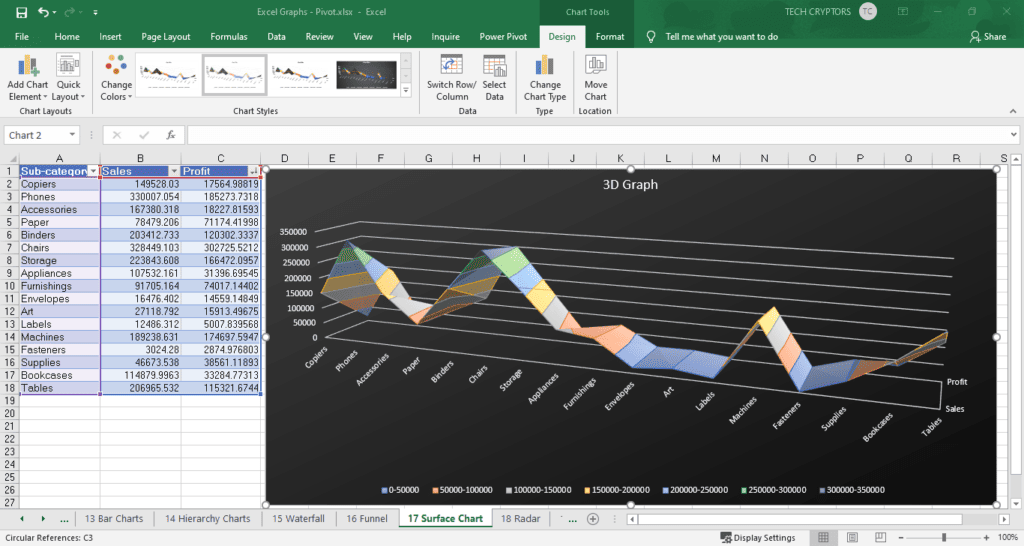
Learn how can we use data & time formulas for different date-time formattings
Learn to efficiently use all text formulas in Advance excel
Learn to use all lookup & reference formulas with different representations
Learn frequently used math functions to manipulate numbers
Learn to use all informative formulas from advance excel
Learn how to record and efficiently use macros on any advance excel sheet
Note For Certification
Earn Certificate
Share Your Achivement
Validated by Ethereum

Original Price
₹26,999 /Course
- Max 4 Students per batch
- 1 to 1 Interaction
- Online & Offline mode
- only Video Training
- limited sessions
- Big batches
Current Price
₹19,999 /Course
- Industry level content
- 100% Practical Training
- Experienced Trainers
- Certification for Course
- Corporate Level Examples
- Many other discounts ASK NOW

Reattempt
₹0/Course
- Free Reattempting of Course
- Long Term Support after Completion
- Free Doubt Solving Sessions / Chats
- Discount for Next Courses
- Real-Time Tasks
- Suggestions & Carrer Counselling